Where should a website keep the images people upload? I first heard the term “OSS object storage” during my internship, and that question is how I came to understand it.
Take an avatar upload feature. An application server's uploads/ directory works, but a second server may not be able to read the same image. If that directory lives in a container's temporary filesystem, rebuilding the container can remove the image too.
Object storage lets an application hand files to a separate storage service, then upload, retrieve, and delete them by identifier. Application servers can change while the images remain in the same storage location. For a Web developer new to cloud storage, an avatar upload is a useful way to understand this division of work.
What is OSS? Separate the product from the storage model
In Alibaba Cloud's terminology, OSS stands for Object Storage Service, the name of its product. Object storage is the broader storage model; Amazon S3 is another service in this category. Their basic concepts are similar, but integration still requires checking each service's APIs, signing rules, and limitations.
An object can be a JPEG, a PDF, a video, a JSON file, or an archive. It does not have to be an instance of a class in your program, and you do not need to turn the file into JSON. When you upload an image, its body is still the image's bytes.
The application uses an interface for storing and retrieving data by name. The service manages the underlying storage. HTTP APIs are the usual interface, with SDKs, command-line tools, and a console as other entry points. The Alibaba Cloud OSS overview describes these options.
How buckets, objects, and keys identify an image
These terms frequently appear together:
| Term | Meaning | Avatar example |
|---|---|---|
| Bucket | A container for objects, with settings such as region and access rules | avatar-demo-bucket |
| Object | File content and its associated metadata | A JPEG's bytes and file properties |
| Key | The object's complete name within a bucket | users/42/avatars/7f3a.jpg |
| Region | The data center region containing the bucket | Hangzhou, cn-hangzhou |
| Endpoint | The address a client uses to send requests to OSS in that region | oss-cn-hangzhou.aliyuncs.com |
The bucket and file names here are teaching examples. This record illustrates an object's properties; it is not an actual OSS API response:
{
  "bucket": "avatar-demo-bucket",
  "key": "users/42/avatars/7f3a.jpg",
  "contentType": "image/jpeg",
  "sizeBytes": 183240,
  "metadata": {
    "purpose": "avatar"
  }
}
The image's binary content is not included in this JSON. Content type, size, and custom properties describe it; the key locates it. purpose=avatar is descriptive information. It does not make OSS determine who is allowed to change the avatar.
A key identifies an object within a bucket. With versioning enabled, the same key can retain multiple versions, and a Version ID identifies a particular historical version. See the object overview for these definitions.
With an OSS default domain, the access address usually combines the bucket, regional endpoint, and key. A custom domain is another option. A URL locating an object does not mean everyone can read it: private objects still require authorization.
Why slashes in a key look like folders
users/42/avatars/7f3a.jpg looks like a directory path. In the ordinary OSS buckets discussed here, it is first of all one complete string name.
The console uses / to display names as folders, and listing operations can filter objects by a prefix such as users/42/. You do not need to create users, 42, and avatars directories before uploading. The bucket documentation explains this flat structure.
This affects application behavior. Changing users/42/ to members/42/ usually means copying ordinary objects to new keys and deleting the old ones, object by object. It is not a local filesystem directory rename, and you cannot assume the entire “directory” moves atomically.
Content updates differ too. A normal PutObject writes an entire object. Writing the same key replaces its current content, with retention of older versions depending on versioning settings. For application design, a useful approach is to upload a new object and then change the reference.
Some APIs provide specialized operations. OSS AppendObject, for example, appends data to an Appendable object. Its object-type and usage restrictions matter. Its existence does not imply full filesystem semantics such as arbitrary in-place writes and file locking.
Choosing object, file, or block storage
The main distinction is how an application accesses its data.
| Type | What the application sees | Common uses |
|---|---|---|
| Object storage | Buckets, keys, and APIs for uploads and downloads | Images, videos, backup files, datasets |
| File storage | Directories and file paths, often accessed over NFS or SMB | Shared directories across machines, existing applications using file interfaces |
| Block storage | A disk volume accessed in blocks, usually with a filesystem managed by the operating system | Server boot disks, database data volumes |
This compares interfaces, not different kinds of physical drives. A filesystem can itself sit on block storage. AWS's comparison of storage types provides more context.
Avatars are commonly uploaded and read as whole images, which fits object storage well. A running database frequently updates data pages and depends on specific persistence and concurrency semantics. A directory exposed by an ordinary object-storage mount tool should not simply become a PostgreSQL data directory. Database backup files, however, are a good fit.
For a single-server application with few files, a properly configured persistent volume and backups may make a local directory sufficient. Object storage reduces the work of sharing files and expanding capacity, while adding network requests, service permissions, and a separate bill. There is no need to add a service just to use the cloud.
Keep relationships in the database and file content in OSS
With PostgreSQL, a user record answers “which avatar does user 42 currently use?” OSS returns the image content for its key. An application could store a record like this, again using illustrative data:
{
  "userId": 42,
  "avatarBucket": "avatar-demo-bucket",
  "avatarKey": "users/42/avatars/7f3a.jpg",
  "avatarStatus": "ready"
}
I would start by storing a stable bucket and key, or a file ID that maps to them. Temporary download URLs expire, and CDN domains can change. Treating those URLs as file identities means changing business records when the access mechanism changes.
Ownership, approval status, and which users may view a file belong in the application's database and logic. OSS custom metadata can describe a file, but it does not automatically provide relational queries or transactions across systems.
Databases can store binary data too, and that can be convenient for small files in some applications. Using a separate object store keeps file transfers and growing storage capacity from falling entirely on the database. The trade-off is maintaining consistency between files and business records yourself.
What happens during a direct browser upload to OSS
One approach sends the image from the browser to the backend, which then uploads it to OSS. This centralizes content checks, while making the backend handle the bandwidth and connections for transferring files.
Another approach has the browser request temporary permission from the backend, then send the file directly to OSS. Alibaba Cloud supports presigned URLs, policy-based form uploads, and STS temporary credentials. This example uses a presigned URL; the browser upload authorization documentation explains the mechanisms.
The diagram shows an example avatar service. The Avatar API belongs to the application, and PostgreSQL stores upload tasks and user records.
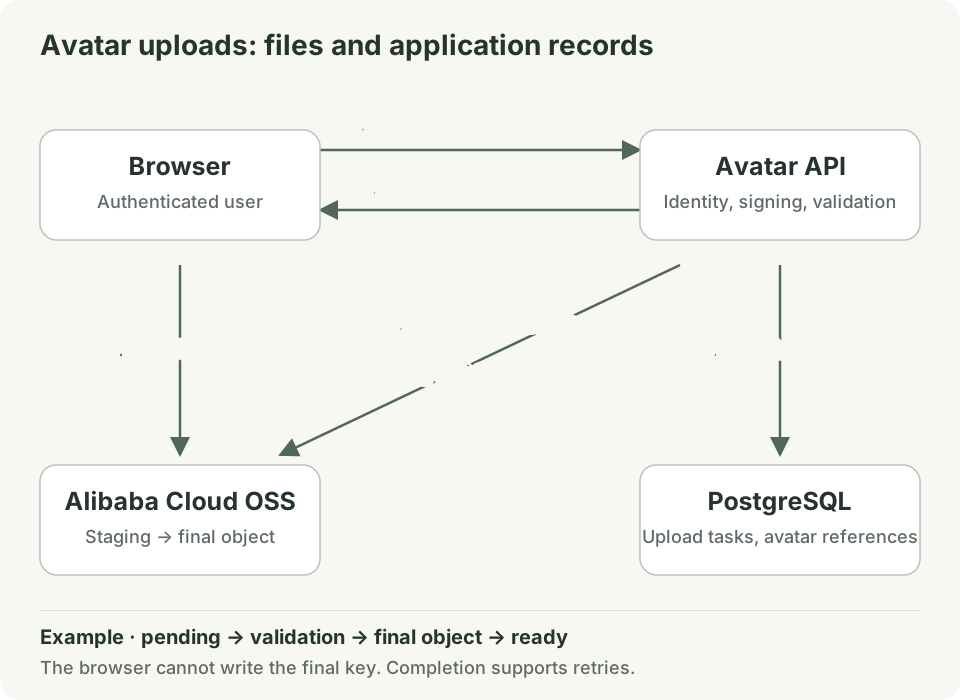
- After login, the browser requests an upload. The backend checks identity, upload frequency, and quota, generates a unique staging key, and creates a
pendingdatabase record. The user ID comes from the authenticated session, not an unchecked browser parameter. - The backend signs a short-lived upload URL for the intended operation and key. The browser receives permission for this upload without needing the server's long-term credentials.
- The browser sends the agreed
PUTrequest, and the file bytes go directly to OSS. Headers included in the signature, such asContent-Type, must match the actual request. - The browser tells the backend it has finished. Using the upload task, the backend locates the object, checks its actual size, and reads and decodes the image to validate its content. An
image/jpegmetadata value alone does not prove the file is a valid JPEG. - The backend writes the validated image content to a new final key, then updates the user's avatar reference and upload status in a database transaction. The browser receives no write permission to that final key. Retrying the completion request should return the same task's result.
Step 5 adds a write, but it addresses an easy-to-miss detail: an upload URL can be reused before it expires, so the staging object could be overwritten again. The presigned upload documentation explicitly describes this behavior.
The example therefore writes the exact bytes the backend validated to the final key. Validating the staging object and then unconditionally copying its latest contents leaves a window for an overwrite between those operations. Large-file systems can use specific versions or conditional requests for a more efficient design, but the validated content and the final reference still need to agree.
This division of work helps reduce file transfer through the backend. If every uploaded byte must pass through backend inspection first, or traffic is small, proxying uploads may be simpler. Direct uploads also do not remove the cost of later review or transcoding.
Temporary authorization and CORS solve different problems
A presigned URL grants temporary authorization for a request. Someone holding it can generally perform the permitted operation while its conditions remain valid. Do not embed signed URLs for private files in public pages or store them as permanent download addresses. A temporary link is not automatically a single-use link.
CORS governs browser requests and response access across origins. When the page and OSS endpoint have different origins, configure the bucket's allowed page origins, methods, and headers. The request must still pass OSS signature and permission checks. CORS does not replace user authentication.
File-size limits need the same distinction between a client-side hint and a server-enforced constraint. A JavaScript check for 5 MB does not stop someone from constructing their own request. When the upload service must enforce a size range, consider the content-length-range condition in an OSS form-upload policy. Do not assume every presigned PUT URL includes a size limit. See the PostObject documentation for supported conditions.
Private downloads follow a similar division: the application checks whether the current user may view the file, then issues a short-lived download URL. Public website images can use public reads or an appropriate CDN access setup, while write permissions remain separately controlled.
A successful OSS upload does not complete the application operation
OSS single-object operations provide atomicity and strong consistency. According to its consistency documentation, after a successful PUT response, a direct read from OSS returns the complete new object. It is inaccurate to describe all object storage as eventually consistent.
That guarantee does not cover the operation spanning PostgreSQL and OSS. Writing the final image can succeed while the database update fails. A browser can also close after a successful direct upload without notifying the backend.
This gives pending and ready a concrete purpose. The application references only validated files, completion supports retries, and a background task uses upload records to remove staging files past their retention period. If the final object was written but the database update failed, the system must retry the association or clean up the orphan. Before deleting an old avatar, check that no business record still references it and allow for requests already in progress.
Large files may use multipart upload: initialize an upload, send its parts separately, and call the completion operation to assemble the object. Failed parts can be retried. Incomplete parts need explicit cancellation or cleanup rules, because they can continue to incur storage charges. See the OSS multipart upload documentation.
Why OSS and a CDN often appear together
OSS stores the source file. A CDN caches files on distributed nodes, serving a cached copy on a hit and fetching from OSS on a miss. The OSS and CDN workflow describes this relationship.
An OSS update can therefore succeed while a user still sees an old avatar in a CDN or browser cache. Storage consistency does not automatically refresh every cache layer.
An avatar update can use a new key, such as replacing 7f3a.jpg with 9bd2.jpg, and then update the database reference. This is easier to manage than repeatedly overwriting avatar.jpg. If a URL must be reused, configure cache lifetimes and refresh behavior. Private content also needs an explicit CDN access-control and caching design; checking that the origin is private is not enough.
Why capacity alone does not explain an object-storage bill
Common charges include storage amount and duration, request counts, and outbound data transfer. Infrequent-access or archival classes may also involve retrieval fees, minimum retention periods, and restoration delays. The combination depends on storage class and enabled features. Check the OSS billing guide and storage-class overview when choosing.
Start with your own usage. At a decimal size of 200 KB per image and 100,000 complete downloads a day, the transferred content is about 20 GB per day. This is a usage calculation, not a cloud price quote; it excludes protocol overhead, cache hits, and image processing.
Standard storage is a sensible starting point for frequently displayed avatars. Historical backups accessed rarely may fit colder classes, depending on recovery-time requirements. Lifecycle rules can transition or delete objects automatically based on conditions; see the lifecycle documentation.
Also distinguish durability from availability: one concerns whether data is lost; the other concerns whether the service is accessible when needed. Storage redundancy does not protect you from every application mistake, including accidental deletion. Versioning, backup retention, and recovery procedures still need to match the data's purpose.
Common questions about OSS object storage
How is OSS different from a consumer cloud drive?
A cloud drive usually includes accounts, folders, sharing, and synchronization for people. OSS mainly exposes storage interfaces for programs. It can be a component underneath a cloud drive, but the complete product still needs an application layer.
Can OSS be mounted as a regular disk?
An adapter can expose file paths, but the object interface and the adapter's implementation still impose constraints. Applications depending on locking, random writes, or consistency across clients need those behaviors verified individually. An accessible path does not prove equivalence with a local disk.
Is object storage only for unstructured images and videos?
No. CSV, JSON, and Parquet files can be stored as objects. Their contents can be structured, but that does not turn the object interface into a relational database offering JOINs and transactions. Queries normally belong to the application or a separate compute engine.
Can I just save the file URL in my database after an upload?
A stable public URL can work in a simple system. A file ID or bucket and key is easier to maintain when access becomes private, domains change, or delivery moves elsewhere. An expiring presigned URL is unsuitable as a permanent file identifier.
Connect the concepts with a small experiment
If you already have an OSS test environment, follow the bucket creation guide to prepare a private test bucket, then try these steps:
- Upload an image containing no personal information with the key
users/42/avatars/demo.jpg. Observe how the console displays “folders.” - Compare anonymous access with authorized access through the console or SDK to distinguish knowing the address from having permission to read it.
- Upload another image under a new key, change the reference in your own test record, and observe that the old object still exists.
- Generate a short-lived signed link for a test object, compare access before and after expiry, and delete the test resources when finished.
When adding avatars to your application, first trace one record: who requested the upload, which OSS key it uses, and which step confirms that the file is ready. Then test an upload followed by a failed database update, and a completion request sent twice. Those cases directly check whether file storage and application state work together.